Projects Links

Click on the "Links"  to go to Project and About Pages Click for Projects Links                                 About the Vess...

Tuesday, March 15, 2016

Installing and Bedding Deck Hardware

Cleat Installation

 This deck cleat, mounted by the mast winches, was previously screwed on the cabin top with stainless steel oval head screws.  There are a few places where using screws would be acceptable, but cleats should be through bolted with proper backing plate or wide fender washer backings.  This cleat was removed and the screws hole filled with thickened epoxy prior to the repainting of the deck.  Below is the description of properly reinstalling the cleat with 5/16" stainless steel oval head bolts.


Preparing the bolt holes

 3/4" flat-blade wood bit
After marking the bolt hole center locations, a 3/4" flat-blade wood bit was used to over drill the bolt holes removing the top fiberglassed layer and the deck coring.  Care was taken to drill the hole deep enough to just remove the wood coring but to leave bottom fiberglass layer intact.  

If the deck hardware was already through bolted, but with bolt holes that exposed the core, these holes should have been prior filled with thickened epoxy along with a proper cleaning of the surfaces removing all traces of the old sealant.

If the coring is wet or rotten it should be removed by reaming the material out and letting it dry.  Soaking the wet core with alcohol aids in water removal and drying.  This is because both are highly soluble in one another and with a higher alcohol to water concentration the vaporization temperature of alcohol is much lower, so the alcohol/water mixture evaporates much quicker.


Over drilled holes remove core material exposing clean dry core.

Filling the bolt holes with Epoxy

Over drilled holes wetted with epoxy. 
Before filling the holes with a thickened epoxy mixture, always wet the hole and remaining core surface with un-thickened epoxy.  Start off by mixing a batch of epoxy resin and hardener. Throughly wet all inside surfaces with the epoxy.  Gently heating the surface (not the epoxy) with a heat gun prior to applying the epoxy helps the wet epoxy soak into the core.  With the hole not going completely through the bottom layer(tap the underside if there is penetration), the hole can be completely filled with epoxy then extracted (after 20-30 seconds) with a syringe leaving behind a throughly wetted surface.  Alternatively, throughly wetting with an epoxy/acid brush also works well.  After soaking the surfaces, the brush can be used to wick up excess epoxy.

Over drilled holes filled with thickened epoxy.
Next, thicken the epoxy with colloidal silica to a mayonnaise consistency.  Completely fill the holes with the thickened epoxy.  The advantage to having on oversized hole is that it is easier to fill the hole with thickened epoxy without leaving trapped air bubbles.  Any remaining air bubbles can be removed by mixing the thickened epoxy in the holes with a small wire (like a straightened paper clip).  An alternative is to gentle heat the epoxy mixture.  This will temporarily make the mixture less viscous and allow it to flow nicely filling up the hole.  Don't over heat the epoxy mixture as it can prematurely kick-off the epoxy.

After the epoxy kicks and while it is still green (hard but soft tacky surface ), the top deck surface with thickened epoxy can be easily cleaned up and trimmed flush otherwise a Dremel with a sanding drum does a nice job of trimming the thickened epoxy when fully cured.
 
Bedding the hardware

Deck cleat properly bedded with Bostic 940FS.
With the thickened epoxy cured, mark the centers for new drill holes aligning the new center marks in the center of the previously filled holes.  Drill the proper sized bolt holes through the center marks and chamfer the holes with a countersink bit.   When bedding, the chamfer provides an area for the sealant to form a gasket around the bolt.

Apply sealant to the underside of the hardware and spread evenly then insert the bolts in the hardware and apply a thick ring of sealant on the top of bolt treads and underside of the hardware.  Now insert all hardware bolts in the holes and simultaneously push down the hardware and bolts.   Now from below, fit a backing plate or use fender washers and snug the nuts by turning the nuts only and not the bolts.  Don't over tighten them.  This will allow the sealant to push out and form a gasket.  Over tightening is bad as it will push out too much sealant limiting proper sealing.  After the sealant has partially cured, tighten down the nuts without moving the bolts.  This is much easier using nuts with separate lock washers rather than the nuts with built-in nylon lock inserts (i.e. nylon lock nuts).

Now for a word on sealant.  Butyl tape works well for bedding hardware, and there are many online references attesting to this.  While I have used butyl for some hardware bedding, lately I have come to favor using Bostik Marine 940FS adhesive/sealant for several reasons.  For one, my marina keeps it in stock at a very reasonable price.  But more importantly, it has performed extremely well.  It also skins over and partial cures in about 30 minutes.  This allows me to bed the hardware, complete the tightening of the hardware,  and clean-up with an hour.

Here is a description of 940FS from the Bostik website:


Bostik Marine 940 FS is recommended for use in bonding and sealing applications, particularly where permanent elastic bonding between surfaces is required. It can be used above and below the waterline. Its outstanding adhesion and UV resistance properties target this product for sealing deck hardware, through-hull fittings, rub-rails and portholes applications.


Newly bedded cleat in use.


DYI Galvanic Isolator

Isolation of Galvanic Voltages (A self inflicted problem)

The main purpose of Galvanic Isolator is to provide isolation from galvanic voltages which result from bonding the AC and DC grounds.  The reason for connecting the AC & DC grounds is to provide an Effective Ground-Fault Current Path from the DC ground to the AC ground.

But in principle, the AC to DC ground connection, and thus a Galvanic Isolator, should not be needed since GFCI( also called ELCI or RCD) protection should be used for all vessel AC loads.  This can be accomplished for the whole vessels by installing an ELCI Main Circuit Breaker such as a BlueSeas model 3106100. In fact, the ABYC E-11 now requires all new vessels to have such a device. An  ELCI/GFCI detects ground-faults and disables the circuit.  Disabling a ground-faulted device by eliminating the power source is much safer than just providing a safe effective ground-fault current path.

Many small and older sailboats do not suffer from galvanic corrosion.  The reason is that these vessels often do not have their AC & DC grounds connected.  If a vessel has only a few AC outlets, then the likelihood of an AC to DC ground-fault is rather small.  Typically on these vessels only a battery charger is interfaced to both AC and DC power systems.  But any decent marine battery charger should be built to ABYC / UL 1236 standards which require isolation of AC & DC (i.e., Don't use cheap chargers).   In any case, one GFCI outlet can protect the whole boat from ground faults making the vessel ground fault safe without the necessity of connecting DC and AC grounds.

So why connect the AC and DC grounds if ELCI/GFCI protects the vessel from ground faults?  To be honest, there is no good reason.  Famed boat guru Nigel Calder advocates against connecting AC and DC grounds.  And new standards no longer require AC to DC ground connections when the "whole-craft" is ELCI protected.  See IOS 13297 excerpt below.

A possible reason given is because of the "other guy".  That is, electrical problems which originate external to (i.e. outside) one's vessel.  These are problems due to faulty or incorrectly wired shore power or poor/faulty electrical systems on neighboring vessels.  While GFCIs can protect a vessel from self ground faults, unfortunately a GFCI will not protect against external faults.  No one wants to work on an engine and end up being the conduit to ground for a stray neighboring current.  In this case, an AC to DC ground connection can provide protection (unless one is removing the engine ground in which case an AC to DC ground connection could be harmful).

Given all of this, it does not make much sense to spend a lot of money on a Galvanic Isolator.  But rather, invest in an ELCI Main Circuit Breaker.  These devices cost less than most Galvanic Isolators.  If one does connect the AC & DC grounds then one should make this connector through a basic Galvanic Isolator like a Yandina (or DYI device like the one described below) since this type of connection, opposed to cutting and inserting into the AC "green" ground, does not compromise the vessel AC ground fault safety, that is a fail-safe connection.   A good DYI Galvanic Isolator is easy to make and cost relatively very little (~$10).   The DYI Galvanic Isolator shown below was made with free scrap material costing only $5.60 for the rectifiers.


Components
Bridge Rectifier
  • (2) Bridge Rectifiers 
    • 50A 1000V Metal Case Bridge Rectifier with Heatsink  
    • KBPC5010
    • Amazon: $2.80 each w/ free shipping
  • length of green wire & solder
  • (2) crimp-on ring connectors
  • (2) 1/4-20 SS bolts for wire terminal ends


Component & Circuit Description

First grab the rectifier and identify the "+" terminal.  This terminal is marked with a "+" and is oriented at right angles to the other three.  Diagonally across from the "+" terminal  is the "-" terminal.  The other two terminals are the AC terminals sometimes marked with a "~".  The "~" terminals are not used and are often best cut off to make it easier for making wire connections and eliminate installation mix ups or later shorting out.  

Below is the circuit diagram.  Shown are the two rectifiers connect by wires.  The arrows show the direction of current flow. Each rectifier connection only lets current to flow in one direction.  The two opposite rectifiers allow current flow in alternating direction (i.e. AC).   But current can only flow when the voltage exceeds ~1.2 Volts (twice the forward bias voltage of single  diode). Since galvanic voltages are well below 1 Volt, galvanic DC currents are blocked whereas AC currents are not.


Circuit Assembly

The diagram shows the input and output green wire connected in the middle of a wire connection of the (+) & (-) of each rectifier.  In fact, it is easy to use one long wire (~ 1ft) on each connection.   A stripped wire end can be tightly wrapped through and around the (-) terminal while the (+) terminal connection can be made by stripping out an inch of insulation from the wire just a little way from the (-) end (without cutting the wire) and wrap this bare wire tightly around the (+) terminal leading remaining wire out.   To further secure the mechanical connection, the wire can be soldered at the terminals.   Alternatively, crimped spade connector connections should also work fine for making wire connections.


Circuit diagram: The arrows show the direction of current flow. Each rectifier connection only lets current to flow in one direction.  The two opposite rectifiers allow current flow in alternating direction (i.e. AC).   But current can only flow when the voltage exceeds ~1.2 Volts (twice the forward bias voltage of diode). Since galvanic voltages are well below 1 Volt, galvanic DC currents are blocked whereas AC c currents are not.


Making a simple housing  container 


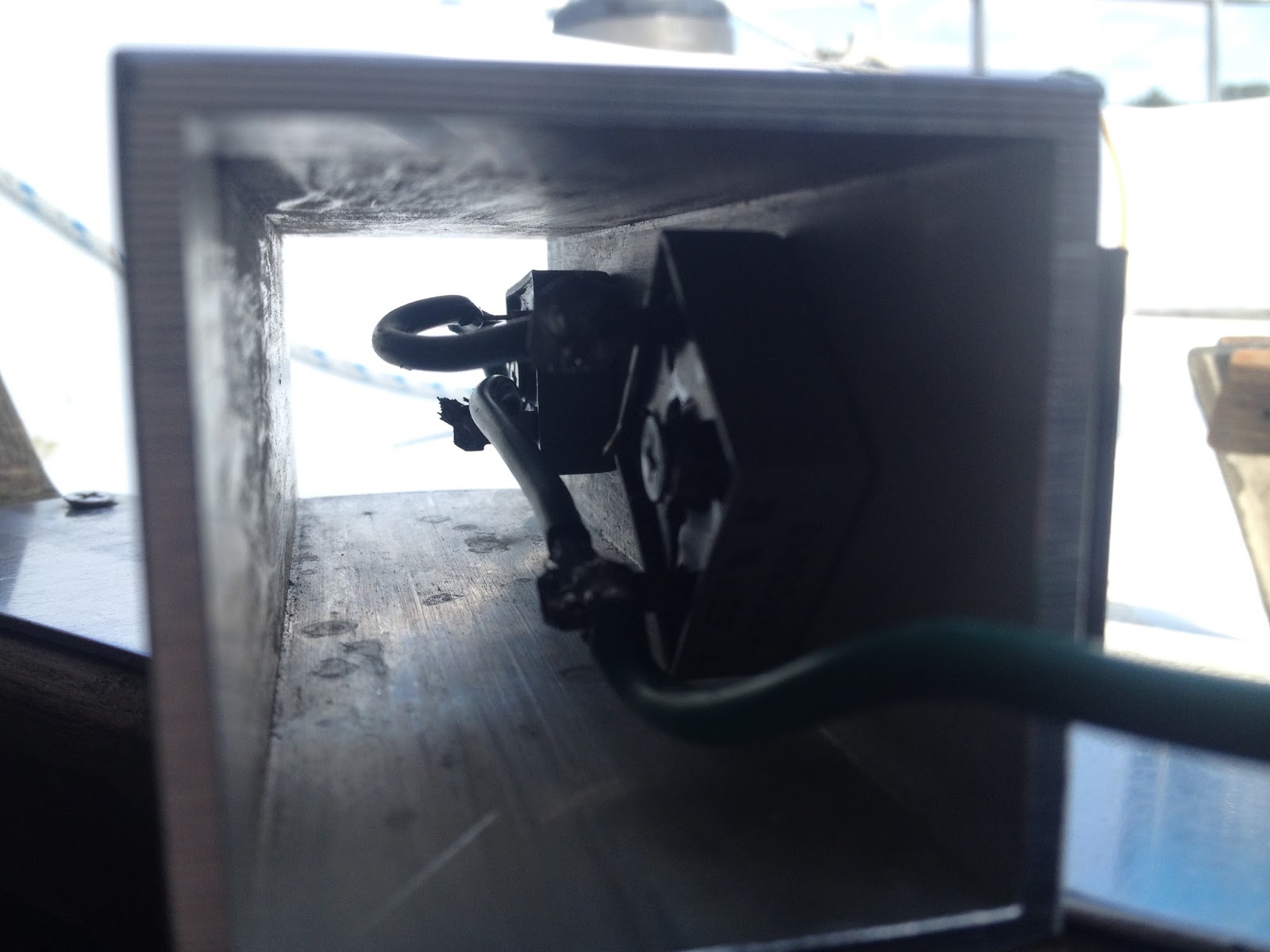
With the galvanic isolator circuit complete, a simple housing box can be fabricated using a scrap piece of square aluminum tube.  Each rectifier can be bolted to the inside and to the heat sink on the outside.  The green wires can be led out the ends and through a simple end caps made of HDPE.  A bolt can be added top each end cap to form connection terminals, and a crimped on ring connection can be added to the trimmed green wire ends and connected the end bolt terminal.  Alternatively, one could use a prefab housing box or even a simple piece of round tube or right angle extruded aluminum. 

Aluminum allows for efficient heat transfer.  But normal operation does not generate heat.  Heat  is only generated if there is an actual ground fault.  In principle, the circuit can operate at currents higher than a 30AMP shore power supply.   But one should also be using GFCI circuit protection which would cut the power if a ground fault exists.   


DYI Galvanic Isolator prior to installation.


A Fail Safe Galvanic Isolator Installation

First off, it is important to use a decent marine battery charger and not a cheap $10ish charger.   All AC loads on a vessel should be GFCI protected, and even better use in addition, an ELCI Main Circuit Breaker in the main AC panel.   Then install a Galvanic Isolator  between the DC ground and the AC ground and not by cutting/installing in the AC green ground line.   This arrangement provides redundant protection mainly via the total GFCI protection and additional safe guards of galvanic isolated AC/DC ground fault path while not breaking the wire or adding components in series to the AC ground fault line.


Extract from ISO13297

4.2 The protective conductor (AC Earth) shall be connected to the craft's d.c. negative ground (earth) as close as practicable to the battery (d.c.) negative terminal.
NOTE If an RCD (whole-craft residual current device) or an isolation transformer is installed in the main supply circuit of the a.c. system (see 8.2), the negative ground terminal of the d.c. system need not be connected to the a.c. shore ground
(protective conductor).


Monday, March 7, 2016

Paragon SAO V Transmission Adjustments

A few months after getting Johanna Rose back into the water, I started to notice a problem with the transmission slipping and thought that I needed to have the transmission rebuilt.  I called Transmission Marine, Inc in Fort Lauderdale and spoke with one of the Paragon experts about a rebuild.  While I received the info on a complete rebuild, I was encouraged to adjust the clutch plates myself first. I received quick instructions over the phone, and later found a nice description online.  Much of the Paragon transmission adjustments described below were provided by Ralph Mudge on the CnC mailing list on Apr 18, 2009.   It turns out that my forward transmission slippage was partly due to a miss-adjustment of the transmission cable causing the transmission to not fully engage (or click) in forward.   My problem was corrected by properly adjusting the transmission cable and by tightening the forward clutch adjustment in the transmission.  At the same time, I adjusted the reversing band. After a year and half and about 50 hrs of engine use later, all still seems fine with the transmission. 

Adjustment of the forward clutches 
Remove the 4 bolts that hold the top cover down and take off the cover. 
(Try to save the gasket, but new ones are cheap)  As you look down into 
the guts, there is a fore and aft shaft that goes through the clutch pack 
that has a castle nut on the end( about 1-1 1/2 ").  With the transmission 
in neutral, turn that shaft with a screwdriver until you find a locking bolt.  
Back off the bolt until you can turn the castle nut.  Careful, a small adjustment 
goes a real long way and there is no frame of reference as to how far 
you have turned it.  In your case, I would try turning it only 2 
notches.  In other words, from the locking bolt turn the nut 
clockwise(facing aft) 2 indentations in the nut (for the locking bolt), 
and lock it down again.  Try it out.  If you have gone too far, the prop 
shaft will slowly turn over in neutral,  meaning that the clutches are 
not fully released. Back up one notch on the nut a try again.  (Though 
neutral is kind of a moving target on this transmission)  If you still 
have slippage, you have not gone far enough, try turning the nut one 
more notch.

Adjustment of the reversing clutch or band
With the top cover off, as you face aft, on the back left side of the 
gearbox, there is a largish nut with a spring clip around it.
Turning that nut clockwise will tighten the band.  Again, small 
adjustments!  One or two flats on the nut make a significant change. 
This will move the reversing movement closer to the neutral spot on the 
shifter, in other words you will not have to push so far down on the 
shifter to fully engage reverse


Top view of Paragon transmission
with top cover removed.


Top cover for Paragon SAO V Transmission


The reserving band adjuster is the horizontal part at the top of the photo
which has holes in the broad bolt-head and goes through the spring. The locking
bolt for the forward clutch adjustment is shown in the center of the photo.   


Transmission Oils
The folks at Transmission Marine, Inc in Fort Lauderdale, recommended the use of ATF or 30W in the paragon and 30W non-detergent oil in the Walter V-drive.  The advantage of ATF is that the fluid provides less drag for the clutch plates in neutral whereas with 30W in the Paragon, the drag can lead to minor turning of the prop shaft while in neutral.  Unfortunately, there are many types of ATF, and some types may actually lead to premature clutch plate slippage.  Because of concerns with transmission slippage, 30W non-detergent is used in both the Paragon transmission and the Walter V-drive.  An added plus is that one only needs to keep one type of transmission oil on hand.


Monday, December 21, 2015

Projects Links

Click on the "Links"  to go to Project and About Pages


Click for Projects Links                              About the Vessel

This blog describes the experiences of purchasing, rebuilding, and sailing a 1981 C&C Landfall 38.  To see details on the vessel and read excerpts from reviews, click on the "About the vessel" link.  For details on the many projects which were done during the main refitting/rebuilding, see the link for the "Projects page".    While the main refitting is done, i.e., the Johanna Rose is now is now fit to sail a reasonable distance, the projects continue.

Saturday, December 12, 2015

Replacing a Burnt-Out Wheel Autopilot Motor

The Raymarine SPX-5 Wheel Autopilot 

The SPX-5 wheel autopilot installed
on Johanna Rose.  
A SPX-5 wheel autopilot is currently installed on Johanna Rose, a C&C Landfall 38.  SPX-5 wheel autopilot system from Raymarine includes a ST6002 controller, SmartPilot X-5 course computer,  ST4000 mk2 wheel drive unit, and a fluxgate compass. Designed for yachts with a laden displacement of up to 16,500 lbs it puts this unit at the limit for a C&C Landfall 38.  I originally purchased this autopilot for my C&C 29 mk1 but at the time when I sold the C&C 29, the autopilot computer was not working, and so I removed the whole unit and put it aside as it was no longer under warranty.  I eventually decided to send the course computer to Raymarine for repair(or at least to see how much it was going to cost).   Even though the unit was past warrantee, Raymarine fixed the course computer and upgraded the computer firmware all free of charge.   It turns out at that time I was looking at various options for new chart plotters, instruments, and transducers.  Needless to say, I ended purchasing all from Raymarine.


Burning-Out the Drive Motor

Having already installed the autopilot on the C&C 29, it was really not much of a challenge to install the unit on the C&C Landfall 38.  There were some minor changes to installation.  Like making use of the NMEA0183 interface to power a Raymarine  i40 speed system, mounting the ST6002 controller on the starboard cockpit bulkhead.   The wheel pilot was performing fine for several months.  I would often tell folks that I prefer not to rely on the autopilot.  Using the autopilot is nice while motoring and raising the main single handed.  But all that said, it is time fess up and eat crow.  I made a big mistake while sailing by myself on a really nice day.  I was sailing close hauled and I had locked the wheel.  I think I was enjoying the day's blue sky too much because after about 15 minutes, I noticed a change in the wind direction, so I reached down, turn on the autopilot, and then jump over to trimmed the sails.  Lesson to self: don't use autopilot with wheel locked.   I only realized what I had done the moment the controller beeped and read "MOT STALL".   After placing the autopilot on standby and freeing the wheel, I reengaged the autopilot and the motor appeared to work fine but within several minutes it stopped working--the damage was done.    I burned out the motor.  A  lesson learned.  I was told by someone that to fix the autopilot, I needed to either replace the wheel drive with a new unit or send in the wheel drive to Raymarine and pay to see if it can be fixed.  The cost of a new ST4000 mk2 from defender is $550.  Before going down this costly path, I decided to search online and I came across the ST4000 mk2 service manual.  It explains how to test the motor and list part numbers.


Testing the motor with a 12V supply in
parallel to a lightbulb.
Removing the Original Drive Motor 

Removing the drive motor was easy.  The drive cable was disconnect.  Then the plastic collar nut was unscrewed from the drive plug socket.   The motor was removed by unscrewing the whole motor tube from the wheel assembly and then gently sliding the motor out from the tube.  The motor was tested by placing 12V across the leads and declared dead.  I should also mention that it was clear from the smell of the motor that it was burnt.  The model marking on the motor where RS-555SH.  A Google search shows that the motor was made by the Mabuchi Motor Company in Japan.


The original ST4000 mk2 motor. A
Google search shows that the motor is
made by Mabuchi Motors model
number RS-555SH.  
The original ST4000 mk2 motor
showing the gear and single locking
screw.


The original ST4000 mk2 motor showing
the 1nF bypass capacitors and soldering
connections.

The original ST4000 mk2 motor with
wire loom and motor end cap.


A Replacement Drive Motor 

Mabuchi motor (left) purchased from
Skycraft shown next to the original
Raymarine A18086 motor. 
Raymarine sells a replacement motor, part number A18086, for about $100.  The Raymarine part come with the motor gear (18T gear teeth) and with bypass capacitors already installed.  But it turns out that the motor is rather common and can be purchased online.  The problem is that the motor does not include the gear nor the bypass capacitors.

One can purchase a Mabuchi motor RS-555SH-TD050112 from Skycraft Parts & Surplus  for $5.95 ($12.20 shipped).    This motor is not an identical replacement as the shaft comes with a flat sided shaft which turn out not to be an issue as the flat part of the shaft is later trimmed off so that the final shaft length is the same length as the original motor's shaft.  For the new motor, the shaft was measured, marked, and cut to length using a simple hacksaw.

Original motor (above) and new motor
with gear installed (below).
Finding a new T18 gear of the same dimensions did not prove fruitful, so the original gear need to be removed and pressed onto the new motor.  This proved to be the most challenging part of replacing the motor.  It is easy to mangle the gear teeth if one is not too careful.    With help, I was able to pry a small screw driver under the gear,  lifting the gear and shaft, exposing the underside of the gear.   At this point, a good hobby pinion gear puller can be used to remove the gear.    The gear was installed on the new motor by heating the gear with a torch and quickly pressing the shaft down onto the gear and finished by compressing down with a C-clamp.


The Soldering Bypass Capacitors and Loom Connector 
Wiring the new 2 nF bypass capacitors

Electrical brushed motors create large amounts of electrical noise.  This noise can interfere with nearby electronics and cause problems.  For noise suppression, it is common that DC motors have up to three bypass capacitors soldered onto the motor: one across the terminals and one from each terminal to the motor case.   This is exactly what Raymarine does to their motors.  The capacitors on the original motors are little ceramic capacitors with the number 102.  Looking this up, 102 is code for 1nF capacitor.

I also removed the original capacitors, and measured the capacitance with a borrowed meter.  Expecting to find 1 nanoFarad, I was surprised to measure 4 nF.  It turns out that a precise value is not too important.  Since I had a readily available supply of 2 nF ceramic capacitors,  I used these for making the new bypass capacitors.
The bypass capacitors soldered in place
on the new motor.

New motor complete with wire loom and end cap (top)
with old motor (bottom).   The sleeve to the left
originally came on the new motor which needs to
be removed before installing new motor.


New motor installed in motor tube ready
 for installation onto wheel drive. 


Installation and Operation 

Before installing the new drive motor, the drive cable was connected and the autopilot tested to see the motor spin forward and backward.   Installing the new drive motor took less than a minute.  First the drive motor was installed into the drive tube assembly, then as I tightened the motor tube to the wheel assembly, I engaged the wheel clutch, rocking the wheel backing and forth so that the gear box would align with the motor while screwing on of the motor tube.

In little time it was tested, but first without engaging the clutch, then engaging the clutch but double checking the steering wheel lock first.   It performed fine at the dock. The seatrial testing has been limited to just holding a course heading.  The sensitivity seems a bit high for my liking but I plan on redoing the seatrial calibration next weekend if weather permits.


 I came across a tossed out ST4000+ wheel drive (black unit)
at my marina.  I took apart the drive motor assembly, and
while the motor looks like an RS-555SH, the gear and gear
collar clearly are different. But the end cap and wire loom
plug assemble are the same as that used for the ST4000 mk2